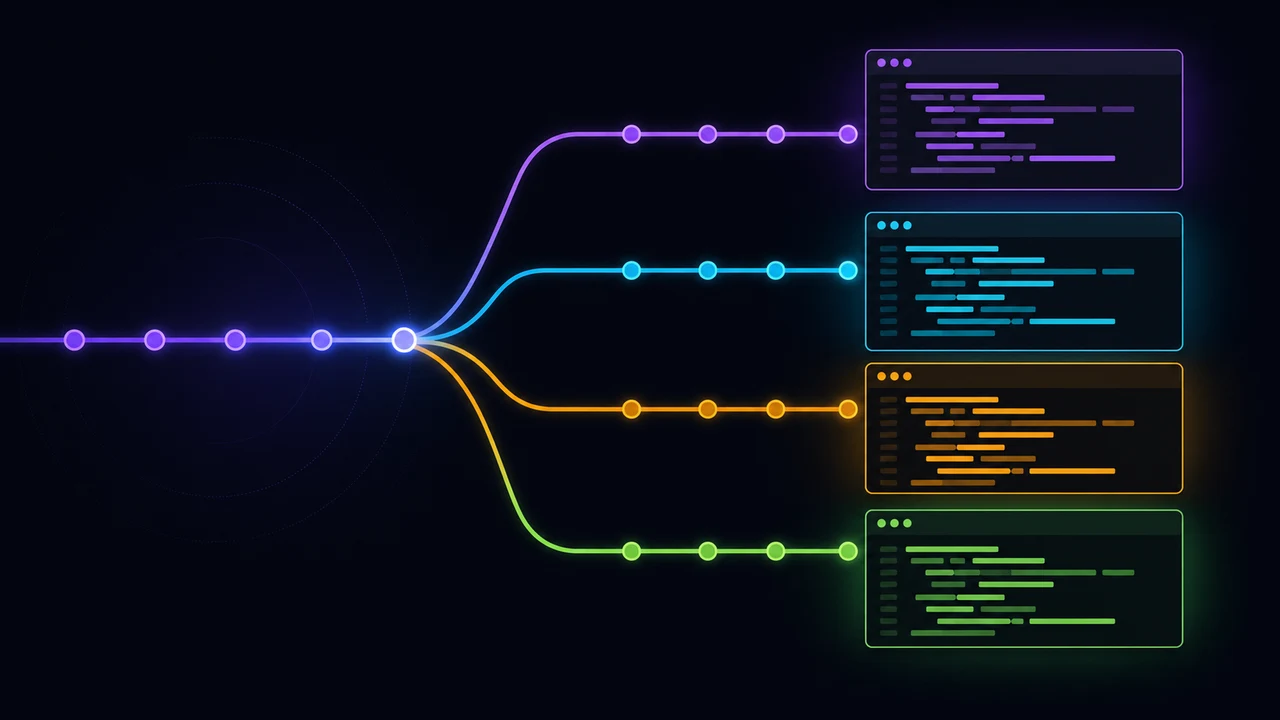
You kick off an AI agent on a refactor. It'll take eight minutes. You want to fix an unrelated bug while you wait, so you reach for git stash, switch branches, and immediately break the agent's working directory out from under it.
That's the bottleneck. AI coding agents work in parallel. A single checkout does not.
Git worktrees solve this, and they've been sitting in git since 2015. Here's how they work, how to set them up, and the parts most guides leave out.
Key Takeaways
- A git worktree is a second working directory on the same repository, with its own branch, HEAD, and index, sharing one object store.
- Measured on this site's repo:
git worktree addfinished in 0.12s against 1.20s for the fastest possible local clone.- Google's 2025 DORA report put AI adoption at 90% and found it raises delivery throughput while lowering stability, pointing at version control maturity as the fix.
- Claude Code supports worktrees natively via
claude --worktree, including.worktreeincludefor copying.envfiles.- The real cost isn't git, it's dependencies. Source files came to 2.2 MB; the same tree with
node_moduleshit 635 MB.
What is a git worktree, exactly?
A git worktree is an additional working directory attached to an existing repository. Git 2.5 shipped git worktree in July 2015, so this isn't new tooling (Git documentation, git-worktree). The repository you cloned is the main worktree. Every one you add afterwards is a linked worktree.
The trick is what gets shared and what doesn't.
Each linked worktree gets its own HEAD, its own index, and its own checked-out files. Everything expensive is shared: the object store, the packfiles, your refs, your remotes. That's why creating one is nearly instant while cloning is not.
Look inside a linked worktree and you won't find a .git directory. You'll find a .git file holding a single line:
gitdir: /Users/you/code/myproject/.git/worktrees/feature-authThat pointer is the whole mechanism. Git reads it, sets $GIT_DIR to that private per-worktree directory, and sets $GIT_COMMON_DIR back to the main repository. Per-worktree state such as HEAD and the index resolves to the private directory. Shared state such as refs/heads/main resolves to the common one.
One object store, many working trees. Source: git-worktree documentation, DETAILS section.
One rule follows from the shared refs, and it trips up everyone once: a branch can be checked out in only one worktree at a time. Two directories writing the same ref would corrupt it, so git refuses.
Why do worktrees suddenly matter for AI coding?
Because the constraint moved. In 2025, Google's DORA team found that 90% of software professionals were using AI at work, a 14% increase on the year before, with a median of two hours a day spent working alongside it (Google Cloud, Announcing the 2025 DORA Report, September 2025). What caps your parallelism now isn't how many problems you can hold in your head. It's how many working directories you have.
That same DORA report found something more useful than an adoption number. AI adoption showed a positive relationship with delivery throughput and a negative one with delivery stability. Google's own reading: acceleration exposes weaknesses downstream, and without "strong automated testing, mature version control practices, and fast feedback loops," more change volume just means more instability.
Worktrees are a mature version control practice. That's most of the argument right there.
Think about what an AI coding agent needs. It needs a directory it fully controls, a branch nobody else is writing, and permission to run a build without a human's half-finished edits in the tree. One checkout gives you exactly one of those. Three worktrees give you three.
This article was written inside a worktree. At the time of writing, this site's repository had nine linked worktrees alongside the main checkout, most named after the blog post or feature being built in each. None of that was arranged for the article. It accumulated.
The workflow difference: without worktrees, running a second task means stashing, switching, working, switching back, and popping. Every one of those steps touches the same files an agent may be mid-write on. With worktrees, the second task happens in a different directory, and nothing you do can reach into the first one.
Agents also fail, and often in the most expensive way possible. In Stack Overflow's 2025 survey, the top frustration developers reported with AI tools was "AI solutions that are almost right, but not quite," at 66%, with another 45.2% saying debugging AI-generated code takes longer than writing it themselves (Stack Overflow, 2025 Developer Survey: AI). Almost-right work is exactly the kind you want quarantined. When it lives in a throwaway directory, you delete the worktree, delete the branch, and your main checkout never knew it happened.
One caveat, and it's a real one. In 2025, METR ran a randomized controlled trial with 16 experienced open-source developers across 246 real issues on repositories they knew well. Those developers predicted AI would make them 24% faster. Afterwards they believed it had made them 20% faster. Measured, they were 19% slower (METR, Measuring the Impact of Early-2025 AI on Experienced Open-Source Developer Productivity, July 2025). METR scopes that finding carefully to experienced developers on codebases they already know deeply, and doesn't extend it further.
The honest version: worktrees don't make agents smarter, and the METR result is a reminder that speed gains are easy to feel and hard to measure. What worktrees remove is the serialization that makes a fast agent feel slow. Most of what you get back is waiting time.
Worktrees vs stash vs clone: which one, when?
Worktrees win when you need two working directories at the same time. Stash wins when you need one directory to briefly become a different thing. Clone wins when you need genuine isolation, including separate refs and remotes.
The benchmark below is from this repository, timed with /usr/bin/time -p, median of three runs each, on a 2.56 MiB packfile with git 2.50.1:
Measured on shajeelafzal.com's repository, git 2.50.1, median of 3 runs. The --local flag is the fastest clone mode available, since it hardlinks objects and skips the network.
Read that gap as the conservative case. git clone --local hardlinks objects and never touches the network. A normal git clone from GitHub on a real project takes seconds or minutes, not one second. The worktree number barely moves as repositories grow, because nothing is being copied.
| Worktree | Stash | Second clone | Branch switch | |
|---|---|---|---|---|
| Parallel directories | Yes | No | Yes | No |
| Shares object store | Yes | Yes | No | Yes |
| Shares refs and remotes | Yes | Yes | No | Yes |
| Survives an agent mid-write | Yes | No | Yes | No |
| Setup cost | ~0.1s | Instant | Full clone | Instant |
| Extra disk | Checked-out files | None | Everything | None |
Use a second clone when you genuinely want separation, such as testing a destructive git filter-repo or working against a fork with different remotes. Otherwise the worktree is the cheaper tool.
How do you create your first worktree?
Two commands. The first creates a directory with a new branch checked out, the second confirms it exists.
# from inside your repo
git worktree add ../myproject.worktrees/feature-auth -b feature-auth
git worktree list
git worktree list prints the main worktree first, then each linked one with its commit and branch:
/Users/you/code/myproject                              065596d [main]
/Users/you/code/myproject.worktrees/feature-auth       065596d [feature-auth]
A few decisions pay off if you make them once, up front.
Put worktrees outside the repository. A sibling directory such as ../myproject.worktrees/ keeps them off your file tree entirely, which means no .gitignore entry, no risk of committing a worktree into itself, and no watcher in your editor scanning them. Nesting them inside the repo works too, but then you must gitignore the directory, and forgetting costs you an afternoon.
Name the directory after the branch. git worktree list shows paths, your shell prompt shows paths, and your editor's window title shows paths. When five are open, matching names are the difference between knowing where you are and guessing.
Learn the shorthand. If you omit the branch, git names the branch after the final path component, creating it if it doesn't exist:
# creates branch "hotfix-login" and checks it out at that path
git worktree add ../myproject.worktrees/hotfix-login
For a throwaway inspection copy that isn't tied to any branch, detach:
git worktree add --detach ../myproject.worktrees/scratch HEADThat's the one to reach for when you want to check out an old release, reproduce a bug, or let an agent poke around without any chance of it committing somewhere it shouldn't.
What does the AI agent workflow actually look like?
One agent, one worktree, one branch, one task. Keep that mapping strict and most coordination problems never happen.
A working pattern that holds up:
REPO=~/code/myproject
WT=$REPO.worktrees

git -C $REPO worktree add $WT/agent-refactor-auth -b agent-refactor-auth
git -C $REPO worktree add $WT/agent-fix-checkout -b agent-fix-checkout
git -C $REPO worktree add $WT/agent-docs-pass    -b agent-docs-pass
Now open a terminal per directory and start an agent in each. They can't collide, because they aren't sharing files. Your own editor stays on main, untouched.
A few rules keep it from falling apart.
Split by file surface, not by size. Two agents editing the same module produce merge conflicts no matter how well each one did. Give one the API layer and another the UI, and both merge clean. This matters more than task size.
Decide merge order before you start. If the refactor branch is going to touch everything, merge it first and rebase the others onto it. Discovering this after three agents finish costs more than the parallelism saved.
Review each branch on its own. The point of isolation is that you can accept one agent's work and throw away another's. Merging them into a shared staging branch before review gives that up.
When a branch is done, clean it up in one step:
git worktree remove $WT/agent-docs-pass
git branch -d agent-docs-pass
Does Claude Code support worktrees natively?
Yes, and this is the part most worktree guides haven't caught up with. Claude Code ships a --worktree flag, so the manual git worktree add above is optional rather than required (Anthropic, Run parallel sessions with worktrees, Claude Code documentation).
claude --worktree feature-auth # or the short form: claude -w feature-authRun that again with a different name in another terminal and you have a second isolated session. Leave the name off and it generates one for you, along the lines of bright-running-fox.
The defaults differ from the convention I recommended earlier, so read them before you settle on a layout. Claude Code puts worktrees at .claude/worktrees/<name>/ inside the repository, on a branch named worktree-<name>, and the docs tell you to add .claude/worktrees/ to your .gitignore. That's the nested layout rather than the sibling one. Both work. If you're letting the tool manage them, take its default and gitignore the directory. If you're managing them yourself, keep them outside the repo.
A few details make the native version materially more convenient than rolling your own:
.worktreeinclude fixes the environment file problem. Drop a file with that name at your project root, written in .gitignore syntax. Files that match it and are gitignored get copied into each new worktree. Anthropic's own example lists .env, .env.local, and config/secrets.json. That's the single most annoying part of manual worktree setup, solved with a four-line file.
worktree.baseRef decides where you branch from. It takes fresh, the default, which branches from your remote's default branch, or head, which branches from wherever you currently are.
You can open a pull request directly into a worktree. claude --worktree "#1234" creates .claude/worktrees/pr-1234 from that PR, which is a fast way to review someone's branch without disturbing your own checkout.
Two smaller behaviors matter in practice. Claude Code runs git worktree lock on an agent's worktree while that agent is running, so a concurrent cleanup can't delete it mid-task. And custom subagents can be pinned to worktree isolation with isolation: worktree in their frontmatter, which means a subagent gets its own tree without you asking for one.
The documentation is also refreshingly blunt about what it doesn't do for you: "A worktree is a fresh checkout, so initialize your development environment there." Which brings us to the part that actually costs time.
What's the setup tax nobody mentions?
Dependencies. Git hands you a working directory in about a tenth of a second, and then your package manager spends the next several minutes filling it.
Here's the real disk footprint across this site's live worktrees, measured with du -sh:
Nine live worktrees on one repository. The 2.2 MB entry is the source checkout alone. Everything above it is dependencies. The shared .git directory costs 27 MB once, not per worktree.
Read that bottom bar again. The checkout git gives you is 2.2 MB. The same directory after installing dependencies is 635 MB. Git is not your disk problem.
Four things bite on almost every stack:
Environment files are not tracked, so they don't come with you. Your .env.local sits in the main worktree and the new one starts without it. Copy it as part of creating the worktree, or the first thing your agent hits is a config error it will try to "fix" by inventing values. If you're on Claude Code, .worktreeinclude handles this for you.
Dev servers fight over ports. Three worktrees running the same npm run dev all want port 3000. Assign a port per worktree and pass it explicitly.
Databases and caches are shared unless you separate them. Two agents running migrations against one local database will corrupt each other's state in a way that looks like an application bug for an hour.
Editors need one window per worktree. Opening two worktrees in one workspace confuses go-to-definition and, worse, lets you edit the wrong copy of a file.
A small setup script handles all of it:
#!/usr/bin/env bash
# newtree <branch-name> <port>
set -euo pipefail
BRANCH=$1
PORT=${2:-3000}
REPO=$(git rev-parse --show-toplevel)
DEST="$REPO.worktrees/$BRANCH"

git -C "$REPO" worktree add "$DEST" -b "$BRANCH"
cp "$REPO/.env.local" "$DEST/.env.local" 2>/dev/null || true
echo "PORT=$PORT" >> "$DEST/.env.local"
(cd "$DEST" && pnpm install --prefer-offline)
echo "ready: $DEST (port $PORT)"
A shared package-manager store pays off heavily here. pnpm keeps one content-addressable store and hardlinks into each project, so the fifth worktree's install is far cheaper than the first. If you're running more than two or three worktrees on a JavaScript project, that alone is worth the migration. If you want a second opinion on your stack before committing to it, that's the kind of thing I cover under technical consulting and architecture.
Which worktree commands will you actually use?
Eight, and you'll use two of them daily. The rest exist for when something goes wrong.
git worktree list                   # what exists, and on which branch
git worktree add <path> -b <branch> # create with a new branch
git worktree add --detach <path>    # create without a branch
git worktree remove <path>          # delete cleanly
git worktree prune                  # clear metadata for trees deleted by hand
git worktree move <path> <new-path> # relocate without breaking the pointer
git worktree repair                 # fix pointers after a manual move
git worktree lock <path>            # stop pruning (external drives, network shares)
git worktree list -v adds annotations, marking a worktree as locked or prunable so you can see which ones are safe to clean up, per the git-worktree documentation.
Two behaviors aren't obvious until they bite. Refs are shared across worktrees, with three exceptions: refs/bisect, refs/worktree, and refs/rewritten stay private to each. And if you set extensions.worktreeConfig, each worktree can carry its own config in .git/worktrees/<id>/config.worktree, read after the shared .git/config. That's how you give one worktree a different user email or a different hook setup.
What goes wrong, and how do you fix it?
Three failures cover almost everything. All three have one-line fixes once you recognize them.
"Branch is already checked out." You tried to open a branch that another worktree already owns:
fatal: 'main' is already used by worktree at '/Users/you/code/myproject'The same message appears if you try to git switch main from inside a linked worktree. Git is refusing because two directories writing one ref would corrupt it. If you only need to read that branch, use --detach. If you need to write, branch off it instead.
Stale metadata after deleting a folder by hand. Delete a worktree directory with rm -rf and git keeps its admin files in .git/worktrees, so the path stays listed and can't be reused. Clean it up:
$ git worktree prune -v
Removing worktrees/scratch: gitdir file points to non-existent location
Git also prunes these on its own eventually, governed by gc.worktreePruneExpire, but waiting is rarely what you want.
A moved worktree that lost its pointer. Move a directory in Finder and the .git file still points at the old location. git worktree repair re-establishes the link. Better still, use git worktree move and it never breaks.
One more, and this one is on you rather than on git: worktrees accumulate. Most of the nine on this repository were finished work I never cleaned up. git worktree list once a week and remove what merged.
Want this workflow set up on your codebase?
I help engineering teams wire up parallel AI agent workflows: worktree conventions, per-branch environments, port and database isolation, and a merge strategy that doesn't produce conflict soup. Book a 30-minute technical consultation and we'll map it to your stack.

Frequently asked questions
What is a git worktree in simple terms?
A git worktree is a second working directory attached to the same repository. Git 2.5 introduced the feature in 2015. Each worktree checks out its own branch and keeps its own HEAD and index, while sharing one object store, so you skip the clone.
Do git worktrees duplicate the whole repository on disk?
No. Worktrees share a single object store in the main repository's .git directory. Only the checked-out files are duplicated. On this site's repo, a fresh worktree costs about 2.2 MB of source files against a 27 MB shared .git directory.
Why can't I check out the same branch in two worktrees?
Git refuses because two directories writing one branch would corrupt its history. You get fatal: 'main' is already used by worktree at .... Use git worktree add --detach for a read-only inspection copy, or branch off with git worktree add -b.
Are git worktrees better than git stash for AI coding agents?
For parallel agent work, yes. Stash serializes you onto one checkout, so a second agent has to wait. Worktrees give each agent its own directory, so several agents run at once without touching each other's files.
What is the biggest hidden cost of using git worktrees?
Dependencies, not git. Git creates a worktree in roughly 0.1 seconds. Installing node_modules into it can take minutes and hundreds of megabytes. On this repo, source files were 2.2 MB while a worktree with dependencies installed reached 635 MB.
How do I delete a git worktree properly?
Run git worktree remove <path> rather than deleting the folder. If you already deleted it by hand, git worktree prune clears the stale metadata in .git/worktrees. Skipping prune leaves entries that block you from reusing the same path.
Does Claude Code create git worktrees automatically?
Yes. Claude Code ships a --worktree flag, so claude --worktree feature-auth creates an isolated session. It places worktrees in .claude/worktrees/ on a branch named worktree-<name>, and a .worktreeinclude file copies your gitignored .env files into each new tree.
Where to start
Pick your next two tasks. Create a worktree for each, name the directories after the branches, and put them in a sibling folder outside the repo. Copy your .env file in, assign each one a different port, and start an agent in each.
The commands take a minute to learn. The habit that matters is smaller than the tooling: stop treating your checkout as the place where all work happens, and start treating it as one of several.
If you're building out a team workflow around this, or you want a review of how your project handles parallel branches, environments, and merges, book a technical consultation and we'll go through it together.
Sources
- Git documentation, git-worktree: Manage multiple working trees, retrieved 2026-07-27, https://git-scm.com/docs/git-worktree
- Anthropic, Run parallel sessions with worktrees, Claude Code documentation, retrieved 2026-07-27, https://code.claude.com/docs/en/worktrees
- Google Cloud, Announcing the 2025 DORA Report, published 2025-09-23, retrieved 2026-07-27, https://cloud.google.com/blog/products/ai-machine-learning/announcing-the-2025-dora-report
- Stack Overflow, 2025 Developer Survey: AI, retrieved 2026-07-27, https://survey.stackoverflow.co/2025/ai
- METR, Measuring the Impact of Early-2025 AI on Experienced Open-Source Developer Productivity, published 2025-07-10, retrieved 2026-07-27, https://metr.org/blog/2025-07-10-early-2025-ai-experienced-os-dev-study/
- Benchmarks and disk measurements in this article were taken on the shajeelafzal.com repository, git 2.50.1 on macOS, 2026-07-27. Timings are the median of three runs via
/usr/bin/time -p; disk figures viadu -sh.
Read more
Claude Certifications in 2026: What the Exam Guides Reveal
Anthropic now runs four Claude certifications, and 36,000 people hold one. The eligibility rule most guides miss, and why the free blueprint beats the badge.

11 Best Shadcn React Libraries (Plus 1 Bonus)
A developer's guide to the best Shadcn-compatible React libraries and UI kits—what they do well, trade-offs, ratings, and when to use each.

Dubai's Hidden Gems: Free Coworking Spaces That Rival Premium Memberships
Discover 5 exceptional free coworking spaces in Dubai, from mall hubs to creative galleries. Complete guide with access details, amenities, and insider tips for digital nomads and freelancers.